Microsoft Internal Cross-Region Transfer Process
Translated from the original Chinese post. Read the original (中文) →
At a friend’s request, here’s a summary of the basic process for a cross-region transfer within Microsoft.
- Read the company documentation
- Once you understand the process, the most important thing is that a team in the target region has head count; then you can apply on the official careers site (https://careers.microsoft.com/).
- In my case, it was a transfer within the same big org. I went straight to the head of my org (my big boss) and asked whether I could transfer. Two months later, he pointed me to a hiring manager with head count (someone I also knew) and asked whether I’d be willing to join. I said yes, and after a chat the hiring manager welcomed me aboard. At first they said I wouldn’t need any more interviews, but later HR apparently needed interview feedback, so three people were hastily lined up to talk to me. I knew all three of them as well; we casually chatted about on-call and a few odds and ends, with no algorithm questions. After breezing through that, I got the offer.
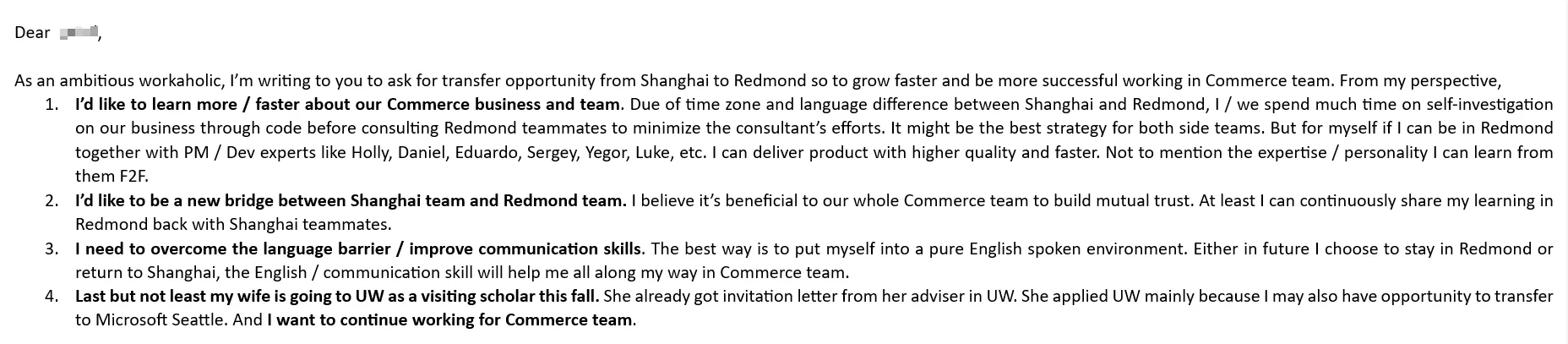
- In my email to my big boss, I gave four reasons that made it hard for him to say no to my transfer. I’ll share it at the end of this post.
- My performance had always been pretty good — 140% two years in a row (i.e., my annual rewards came in at 140% of target). I’d also started early on building some visibility in the org. For example, I took on developing and improving some internal tools, and when people in the org emailed with questions, I’d often jump in and answer them, and so on.
- Once you’ve interviewed and gotten the offer, plenty of teams will help you with the remaining steps. The main things to take care of are:
- L-1 visa: L-1A if you’re a manager, otherwise L-1B. On an L-1 you can’t change jobs in the US — you have to keep slaving away for Microsoft until you win the H-1B lottery or get a green card. The company’s immigration team will communicate with you by email. Since I was transferring to US headquarters, the work was outsourced to EY (Ernst & Young) in Canada to help me prepare the materials for the visa application. They provide a complete list of the required documents and asked me to upload all of them to Microsoft’s internal (US Immigration Portal).
- Since I initiated the transfer myself, I didn’t get a relocation package, so I got to skip that part. Reportedly there are usually two options: a lump sum of cash (taxable in the US), or cash plus moving services (including sea freight, a one-way flight, the first three months’ rent, a rental car, and so on).
- Buy your own plane ticket to the US and fly over. After you arrive, look up your I-94 online, then complete the I-9 required for onboarding. Just follow the steps in the emails from Microsoft’s immigration team.
Here’s the email I sent my big boss back then:
Comments
No comments yet — be the first to leave one.